

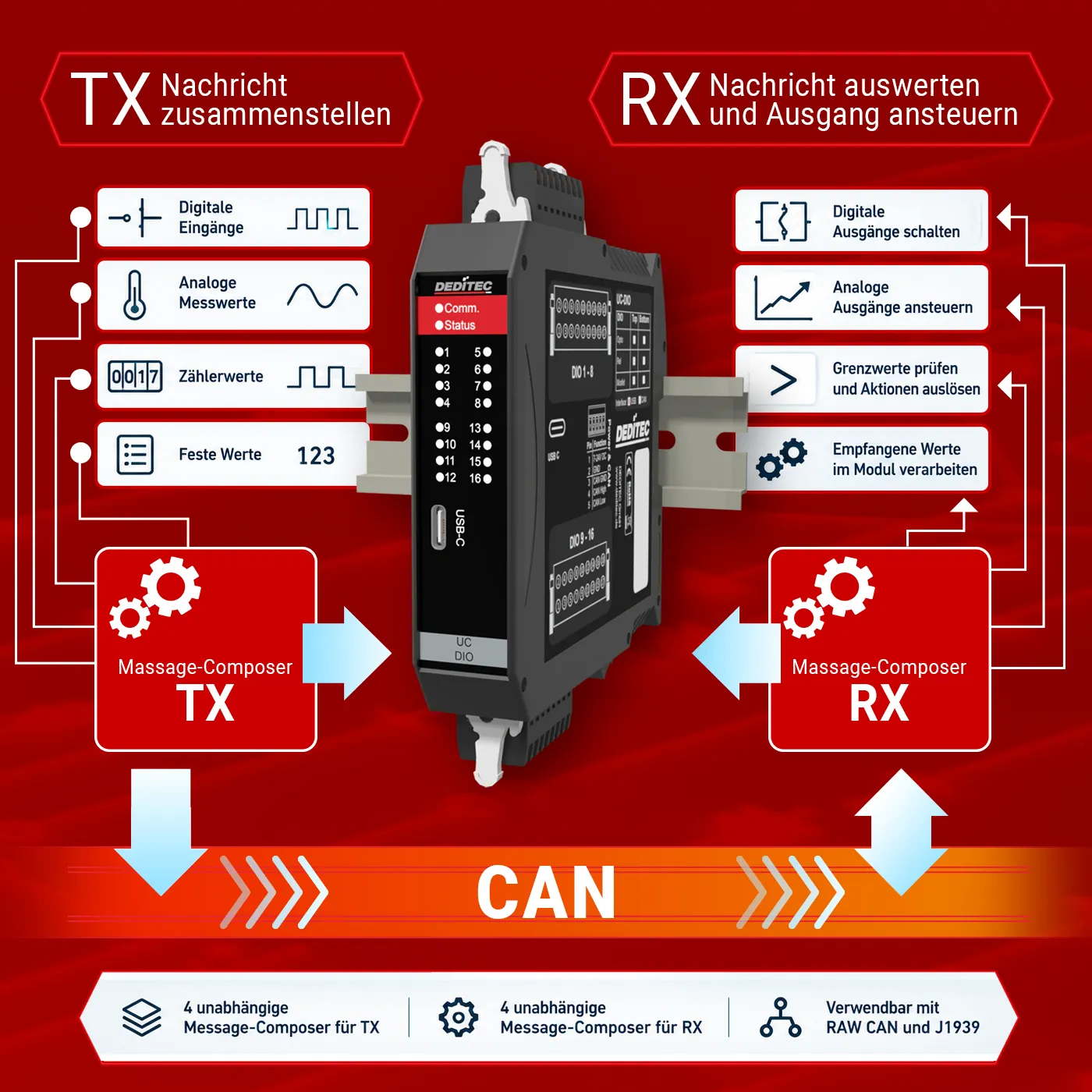
Flexibly configure, receive, and process data directly in the module!
A digital input, an analog measured value, and a counter value in a single CAN message? With the Message Composer in the DEDITEC ICT-Tool, you can configure the data for your CAN communication individually. Received messages can also be evaluated selectively and assigned to the required outputs – without any custom programming.
TX: transmit exactly what your application requires
With the Message Composer for TX data, you define which module values are transmitted and in which order they appear in the message. Depending on the module configuration, you can, for example, combine digital input states, analog measured values, and counter values or add fixed values. If required, values can also be scaled before transmission.
RX: turn messages into actions
The Message Composer for RX data determines how incoming data is processed. Received values can, for example, switch digital outputs or control analog outputs. Comparisons and range checks are also possible: an output can, for example, be switched when a received value exceeds a defined limit.
Four independent Message Composer configurations are available for both TX and RX. Once configured, processing is performed directly by the module. No additional PC application is required during operation.
The Message Composer can be used with both RAW CAN and J1939 addressing, providing greater flexibility for your individual CAN application.