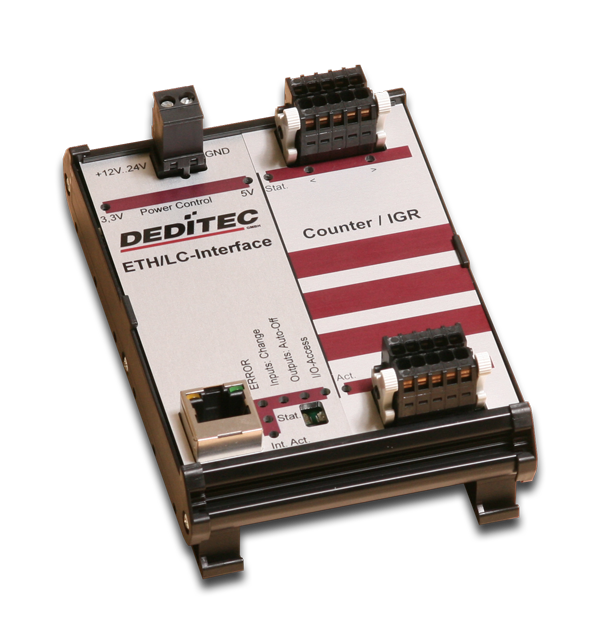
DIN rail USB-Module with inputs for 2 incremental encoders
RO-USB-CNT/IGR2
DIN rail USB-Module with inputs for 2 incremental encoders
- USB-Interface controlled input modules
- Connection for 2 incremental encoders
- DIN rail module
- Pluggable terminal block for the connection wiring
The USB input modules are designed to work under industrial environments for process measuring and control technology. Every module has a USB interface and is therefore easily connectable to a PC's USB bus. The flexible USB bus is an established interface for years and points to its high flexibility.
The particularity hereby is the concept of galvanic isolation of the USB bus' module. The galvanic isolation protects against voltage peaks.
The CNT/IGR-Modules are able to record changes in the position (linear) or the angular changes (rotating), the distance and travel direction or the angle change and the direction of rotation. The acquisition is via a connected incremental encoder.
As terminal block, user-friendly terminal strips with locking protection and ejection mechanism are used. They allow quick replugging . The wire connection itself is realised with a screwless connector system. A tool is included with each module.

More info
USB-interface
Transfer rate
The supported standards are USB 2.0 and USB 1.1. The transfer rates are 12 MBit/s or 1,5 MBit/s.
USB-interface connection (galvanically isolated)
The connection of the module to the PC interface is done through a provided 3m USB adapter cable. The adapter ensures a safe galvanic isolation and allows a cable length of over 100m.
Inputs
Visual monitoring of inputs
The state of every incremental encoder and its rotation is directly indicated by a LED. That way, wrong wiring is easily noticeable.
Accurate detection via incremental encoder
By subsequent evaluation of pulse numbers, pulse frequency and phasing you can determine the way, the speed and the rotation via incremental encoder.
Referencing
By restarting the incremental encoder the absolute position can not be recognized and the Position will be set to 0.
In this case Incorrect measurements can be a result. With limit switches the reference movements can be set so a determined position that can be approached. This leads to the exact calibration of the encoder.
Incremental encoder delivers per full rotation an extra reference pulse (Index) on a third channel. Some Incremental encoder have a distance-coded reference mark.
Connector
Easy to maintain connector system
The plug and socket consist of a multipoint socket connector and a multipin connector with a throw-off lever. Plug-in and plug-out is easy as well as rewiring the terminal strip. The wire connection itself is realized with a screwless connector system. A tool is included with each module.

Config
Configuration of USB modules
A configuration of a USB product is not needed - this complete the driver with their Plug and Play mechanism.
Working with several modules
Are more than one USB products working on a system, the driver library differentiate between these modules.
Every brand new USB product has the ID "0". The ID can be changed by the DELIB-Configuratin Utility and will be stored in an EEPROM on the module.
So you can use up to eight identical modules on one pc.
Working with several modules on one pc
| DELIB-Configuration Utility für USB Module |
|
Click to enlarge ![]() |

Tech.-Info
USB-Interface |
|
| Power Supply | 7 to 24V DC (by a double-pole pluggable screw clamp) |
| Interface |
USB (galvanically isolated using optocoupler) 9 pin. D-SUB socket connector USB 2.0 / USB 1.1 One LED for each 3,3V and 5V voltage feed |
| API-library | Easy to implement C library to access the inputs and outputs |
| Control-LED |
USB-activity ERROR Input state change (only for digital outputs) Timeout (only for outputs) I/O Module access |
Incremental-Encoder-Modules |
|
| Inputs |
2 incremental encoder inputs Galvanic isolated using optocoupler |
| Activity-LED |
Activity LED (short blink on communication on the interface) Status LED (short blink on accessing the incremental encoders) Direction LED's (illuminates depending on chosen direction of rotation of the incremental encoders) |
| Connectors | 10 pin pluggable terminal block for 2 incremental encoders |
General |
|
| Operating temperature | 10°C...+50°C |
| Dimensions | 85mm x 126 mm x 31 mm (LxBxH) |

Diagrams
Functionality of the product


Software
Controlling by the DELIB DLL under Windows
The DELIB DLL allows a standard respond of all DEDITEC measurement modules. For this we provide all functions of our products to the software engineer.
Simple testprogram with example for digital inputs
| Digital Input/Output Sample Testprogramm für Module |
|
Click to enlarge ![]() |
With this tool you can test our products very easily. It is easy to handle and supports all modules of DEDITEC. The example above shows a test of a RO-USB-O32 input module.
Examples for responding our products with "C"
In the following example we show you in "C", how to access to our input modules in short time.
1. Step: Open the module
handle = DapiOpenModule(RO-USB,0); // Open USB-module
2. Step: Reading of 16 digital inputs
data = DapiDIGet16(handle, 0); // Read the first 16 digital inputs
3. Step: Close the module
DapiCloseModule(handle); // Close the module
The function "DapiOpenModule" is used to open a special kind of module.
Which module should be openend, is defined by the two parameters.
The first parameter is for the "module ID". By the integrated "DELIB.H", you can also set this parameter to "RO-USB1".
So the driver library recognize, that an ethernet interface will be driven.
The second parameter assigns the module number. If only one module is connected to the pc, the module number is "0". Are there more than one modules in the network, you have to set the correct number.
Controlling of more than one USB-module
Example for opening several modules on one pc:
Open a module with ID "1"
handle1 = DapiOpenModule(RO-USB1,1); // open USB-module with ID=1
Open a module with ID "4"
handle2 = DapiOpenModule(RO-USB1,4); // open USB-module with ID=4

Overview about available DELIB-Functions
General
General Handling
DapiOpenModule
ULONG DapiOpenModule(ULONG moduleID, ULONG nr);
This function opens a particular module. p>
DapiCloseModule
ULONG DapiCloseModule(ULONG handle);
This command closes an opened module. p>
DapiGetLastError
ULONG DapiGetLastError();
This function returns the last registered error. p>
DapiGetLastErrorText
ULONG DapiGetLastErrorText(unsigned char * msg, unsigned long msg_length);
This function reads the text of the last registered error. p>
DapiGetDELIBVersion
ULONG DapiGetDELIBVersion(ULONG mode, ULONG par);
This function returns the installed DELIB version. p>
Special
Special functions
DapiSpecialCommand - DapiSpecialCMDGetModuleConfig
ULONG DapiSpecialCommand(ULONG handle, DAPI_SPECIAL_CMD_GET_MODULE_CONFIG, par, 0, 0);
This command returns the hardware equipment (number of in-/output channels) of the module. p>
Digital-input
Digital input functions
DapiCnt48ModeSet
void DapiCnt48ModeSet(ULONG handle, ULONG ch, ULONG mode);
This command sets the count mode for a single input channel. p>
DapiCnt48ModeGet
ULONG DapiCnt48Modeget(ULONG handle, ULONG ch);
This command returns the count mode of a single input channel. p>
DapiCnt48CounterGet32
ULONG DapiCnt48CounterGet32(ULONG handle, ULONG ch);
This command reads the first 32 bits of a 48 bit input counter. p>
DapiCnt48CounterGet48
ULONGLONG DapiCnt48CounterGet48(ULONG handle, ULONG ch);
This command reads a 48 bit counter of an input counter. p>

Connector
Plug connection
Screwless plug connectors
All input and output connectors have a practical, screwless terminal block. An mechanic ejection guarantees a very quick module change without any special tools. Wire connection happens with screwdriver or an included plastic pin. (s. pic.1)
Pic1:
Connection example of a RO-Module
![]() |
RO-MODULE | |
![]() |
Step 1:
| |
![]() |
Step 2:
| |
![]() |
Step 3:
| |
![]() |
Step 4:
|

Optional E.
Hutschiene-1m
Die 1m Hutschiene eignet sich optimal zur schnellen Montage unserer Steuer/Regeltechnik-Module.
Netzteil 24V/2A für Hutschinenmontage
Das Hutschienen-Netzteil bietet Anwendern eine sichere Arbeitsumgebung und ist eine ideale Spannungsversorgung für unsere Steuer/Regeltechnik-Module. Es besitzt einen Wirkungsgrad von bis zu 80% und Internationale Sicherheitszulassungen Dank der Isolationsklasse 2 als auch der Sicherheit die das Hutschienen-Netzteil bietet.
10 poliger Steckverbinder mit Auswerfmechanik
Unsere Steckverbinder bieten einen einfachen und sicheren Anschluss an unsere Module. Durch die integrierte Auswerfermechanik ist das nachträgliche Austauschen der angeschlossenen Module möglich.

Manuals
Manuals
Manual RO-Series
Manual RO-Series Technical hardware manual for the whole RO-Serie
- Description of the measurement modules
- Configuration of the different module interfaces
- Installation of the DELIB driver library
Manual RO-USB-INTERFACE
Manual RO-USB-INTERFACE (Extract of the Manual RO-Series)Software documentation of our RO-USB-Interfaces
Manual RO-Register Assignment
- Description accessing the registers
- Description of the input, ouput and configuration registers
- Installing the DELIB driver library
Datasheets
Datasheets
Driver
Driver / Programs
DELIB USB driver for Linux
The DELIB USB driver for Linux supports following products:
- RO-USB-Series
- USB-Mini-Sticks
- USB-Watchdog
- Linux Kernel 2.6.x
Manual for DELIB Driver Library for Windows 7, Windows Vista, XP, 2000 and Linux
Manual for DELIB Driver Library for Windows 7, Windows Vista, XP, 2000 and Linux Documentation of all functions
- module open/close functions
- Digital Input read 1 / 8 / 16 / 32 / 64 bit
- Digital Output write 1 / 8 / 16 / 32 / 64 bit
- A/D Read, read_volt, read_mA, set A/D mode
- D/A Write, write_volt, write_mA, set D/A mode
DELIB driver library for Windows 7, Vista, XP and 2000
Installation file for USB driver
supports the following operating systems: 32 Bit:
- Windows 7
- Windows Server 2008
- Windows Vista
- Windows XP
- Windows Server 2003
- Windows 2000
64 Bit:
- Windows 7 x64
- Windows Server 2008 x64
- Windows Vista x64
- Windows XP x64
- Windows Server 2003 x64
Downloads
Downloads
RO Flasher Update
RO Flasher Update Flasher software for firmware update of the RO-CPU Modules and the Mini Sticks