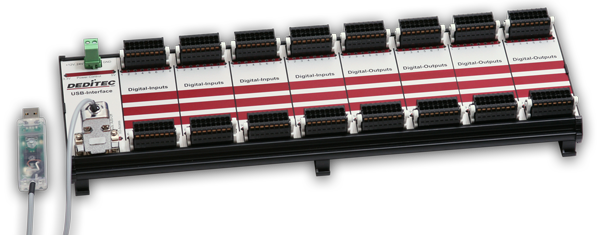
USB-in-/output modules with 8 in- and 8 outputs (relay 1A)
RO-USB-O8-R8
USB-in-/output modules with 8 in- and 8 outputs (relay 1A)
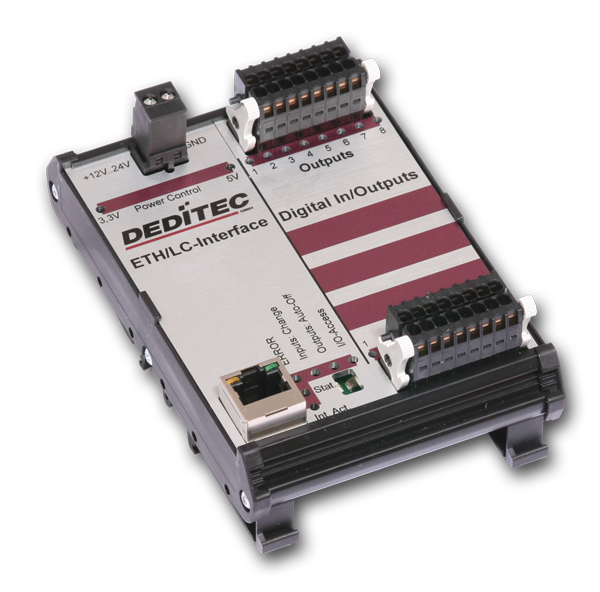
- Ethernet-interface controlled in-/output modules
- 8 Opto-Out outputs und 8 Opto-In inputs
- LED status indication per in- and output state
- Timeout output protection
- Galvanic isolation by optocoupler
- DIN rail module
- Pluggable terminal block
USB-Interface
The USB input modules are designed to work under industrial environments for process measuring and control technology. Every module has a USB interface and is therefore easily connectable to a PC's USB bus. The flexible USB bus is an established interface for years and points to its high flexibility.
The particularity hereby is the concept of galvanic isolation of the USB bus' module. The galvanic isolation protects against voltage peaks.
digital in- and outputs
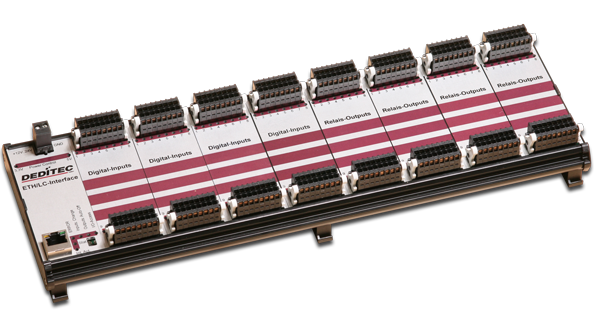
The RO-series is about input/output modules, which are designed to work in industrial application in switchboards for measuring and control technology . We offer you the possibility to combine several I/O modules to one unit.
Time function
This hardware-controlled function allows to switch the outputs safely after a certain time controlled by a timer. So you can for example set a time of 5 minutes to switch different relay outputs and the module turns the outputs without using software that something must be done to another. There is no further action required by software. The module handles all this for you automatically.
Connectors
As terminal block, user-friendly terminal strips with locking protection and ejection mechanism are used. They allow quick replugging . The wire connection itself is realised with a screwless connector system. A tool is included with each module.

More info
USB-interface
Transfer rate
The supported standards are USB 2.0 and USB 1.1. The transfer rates are 12 MBit/s or 1,5 MBit/s.
USB-interface connection (galvanically isolated)
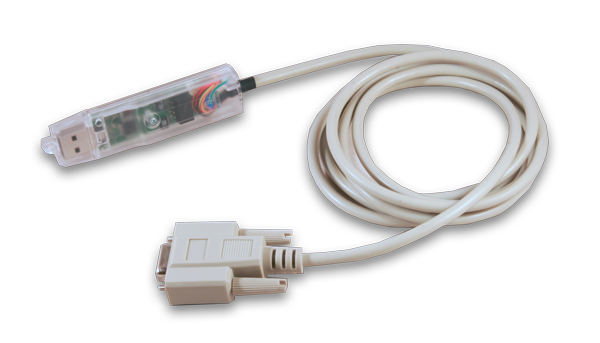
The connection of the module to the PC interface is done through a provided 3m USB adapter cable. The adapter ensures a safe galvanic isolation and allows a cable length of over 100m.
Inputs
Visual monitoring of inputs
The state of every input is directly indicated by a LED. That way, wrong wiring is easily noticeable.
Detecting short input pulses
The module won't miss fast state changes, even if the inputs are sampled in larger periods. Fast state changes between two readout-cycles are detected through an additional logic and can be readout by software. A LED (combined for all inputs) indicates a "state change". The LED does not extinguish until the software register for input state changes is read out.
Counter
Every input channel has a 16 bit counter. The maximum counting speed is 10kHz. Herewith the module "counts" additional events.
Input protection using optocoupler
The inputs have AC-suitable optocouplers. Therefore you don't need to pay attention to the polarity while wiring the inputs.
Input voltage
By default the inputs are designed for a voltage of 24V. They can be adjusted (even later) to 15V, 12V or 5V.
Relay Outputs
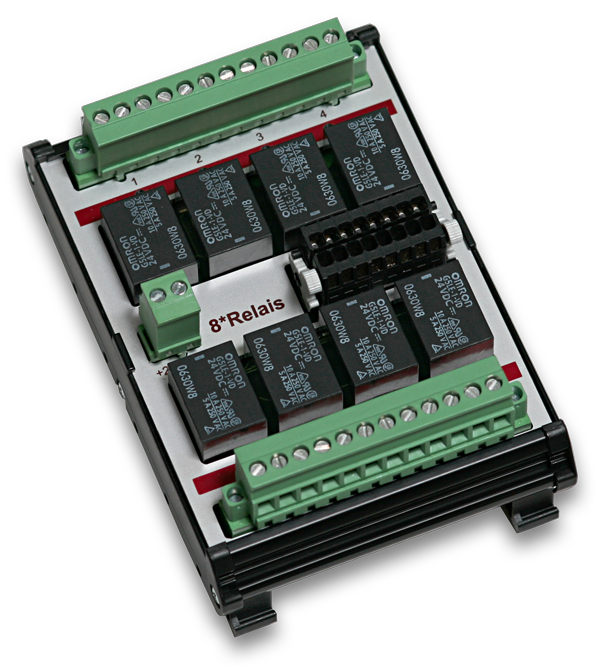
Relay-outputs (galvanically isolated, permanent load of 1A AC)
Relays ensure a save galvanic isolation of the outputs. They are designed for up to 36V/1A. Maximum switchable power is 20W.
Timeout-protection
If required, a timeout-protection may be enabled, switching automatically off the outputs to prevent damage. This takes place, when e.g. the communication gets lost. Switching off the outputs is indicated by a LED.
Relay Outputs
Relay-outputs (galvanically isolated, permanent load of 1A AC)
Relays ensure a save galvanic isolation of the outputs. They are designed for up to 36V/1A. Maximum switchable power is 20W.
Timeout-protection
If required, a timeout-protection may be enabled, switching automatically off the outputs to prevent damage. This takes place, when e.g. the communication gets lost. Switching off the outputs is indicated by a LED.
Time function for digital outputs
The time function allows the hardware to control outputs.
If the outputs regardless of the software for a certain time on or off, so our O8-R8 Module is ideal, because this function is controlles directly from our module.
Is a set time, then it needs no further attention, because the outputs switch reliably after the time.
Connector
Easy to maintain connector system
The plug and socket consist of a multipoint socket connector and a multipin connector with a throw-off lever. Plug-in and plug-out is easy as well as rewiring the terminal strip. The wire connection itself is realized with a screwless connector system. A tool is included with each module.

Config
Configuration of USB modules
A configuration of a USB product is not needed - this complete the driver with their Plug and Play mechanism.
Working with several modules
Are more than one USB products working on a system, the driver library differentiate between these modules.
Every brand new USB product has the ID "0". The ID can be changed by the DELIB-Configuratin Utility and will be stored in an EEPROM on the module.
So you can use up to eight identical modules on one pc.
Working with several modules on one pc
| DELIB-Configuration Utility für USB Module |
|
Click to enlarge ![]() |

Tech.-Info
USB-Interface |
|
| Power Supply | 7 to 24V DC (by a double-pole pluggable screw clamp) |
| Interface |
USB (galvanically isolated using optocoupler) 9 pin. D-SUB socket connector USB 2.0 / USB 1.1 One LED for each 3,3V and 5V voltage feed |
| API-library | Easy to implement C library to access the inputs and outputs |
| Control-LED |
USB-activity ERROR Input state change (only for digital outputs) Timeout (only for outputs) I/O Module access |
Optocoupler-input and relay-output module |
|
| Eingänge |
8 Opto-In-Inputs Galvanic isolated using optocoupler 24V AC switching voltage (optional as well available for 15V, 12V, or 5V) 16 Bit-counter per input channel (maximum counting speed is 10kHz) Logging of impulses between 2 read out cycles |
| Ausgänge |
16 Relay output Time function (hardware function: output is for a specific time on or off) Very fast switching operations Galvanically isolated using relays Max. switching voltage: 36V AC / 36 V DC Max. switching current: 0.5A AC / 0.5V DC Max. switching power: 10W |
| Anzeige-LEDs | One LED per input channel |
| Steckverbinder | 16 pin pluggable terminal block for each 8 outputs |
General |
|
| Operating temperature | 10°C...+50°C |
| Dimensions | 126mm x 126 mm x 31 mm (LxBxH) |

Diagrams
The block diagram illustrates how the module is constructed.


Software
Controlling by the DELIB DLL under Windows
The DELIB DLL allows a standard respond of all DEDITEC measurement modules. For this we provide all functions of our products to the software engineer.
Simple testprogram with example for digital inputs
| Digital Input/Output Sample Testprogramm für Module |
|
Click to enlarge ![]() |
With this tool you can test our products very easily. It is easy to handle and supports all modules of DEDITEC. The example above shows a test of a RO-USB-O32 input module.
Examples for responding our products with "C"
In the following example we show you in "C", how to access to our input modules in short time.
1. Step: Open the module
handle = DapiOpenModule(RO-USB,0); // Open USB-module
2. Step: Reading of 16 digital inputs
data = DapiDIGet16(handle, 0); // Read the first 16 digital inputs
3. Step: Close the module
DapiCloseModule(handle); // Close the module
The function "DapiOpenModule" is used to open a special kind of module.
Which module should be openend, is defined by the two parameters.
The first parameter is for the "module ID". By the integrated "DELIB.H", you can also set this parameter to "RO-USB1".
So the driver library recognize, that an ethernet interface will be driven.
The second parameter assigns the module number. If only one module is connected to the pc, the module number is "0". Are there more than one modules in the network, you have to set the correct number.
Controlling of more than one USB-module
Example for opening several modules on one pc:
Open a module with ID "1"
handle1 = DapiOpenModule(RO-USB1,1); // open USB-module with ID=1
Open a module with ID "4"
handle2 = DapiOpenModule(RO-USB1,4); // open USB-module with ID=4

Overview about available DELIB-Functions
General
General Handling
DapiOpenModule
ULONG DapiOpenModule(ULONG moduleID, ULONG nr);
This function opens a particular module. p>
DapiCloseModule
ULONG DapiCloseModule(ULONG handle);
This command closes an opened module. p>
DapiGetLastError
ULONG DapiGetLastError();
This function returns the last registered error. p>
DapiGetLastErrorText
ULONG DapiGetLastErrorText(unsigned char * msg, unsigned long msg_length);
This function reads the text of the last registered error. p>
DapiGetDELIBVersion
ULONG DapiGetDELIBVersion(ULONG mode, ULONG par);
This function returns the installed DELIB version. p>
Special
Special functions
DapiSpecialCommand - DapiSpecialCMDGetModuleConfig
ULONG DapiSpecialCommand(ULONG handle, DAPI_SPECIAL_CMD_GET_MODULE_CONFIG, par, 0, 0);
This command returns the hardware equipment (number of in-/output channels) of the module. p>
Digital-input
Digital input functions
DapiDIGet1
ULONG DapiDIGet1(ULONG handle, ULONG ch);
This command reads a single digit input. p>
DapiDIGet8
ULONG DapiDIGet8(ULONG handle, ULONG ch);
This command reads 8 digital inputs simultaneously. p>
DapiDIGet16
ULONG DapiDIGet16(ULONG handle, ULONG ch);
This command reads 16 digital inputs simultaneously. p>
DapiDIGet32
ULONG DapiDIGet32(ULONG handle, ULONG ch);
This command reads 32 digital inputs simultaneously. p>
DapiDIGet64
ULONGLONG DapiDIGet64(ULONG handle, ULONG ch);
This command reads 64 digital inputs simultaneously. p>
DapiDIGetFF32
ULONG DapiDIGetFF32(ULONG handle, ULONG ch);
This command reads the flip-flops from the inputs and resets them.
(Input state change). p>
DapiDIGetCounter
ULONG DapiDIGetCounter(ULONG handle, ULONG ch, ULONG mode);
This command reads the counter of a digital input. p>
Special
Special functions
DapiSpecialCommand - DapiSpecialCounterLatchAll
void DapiSpecialCommand(ULONG handle, DAPI_SPECIAL_CMD_COUNTER, DAPI_SPECIAL_COUNTER_LATCH_ALL, 0, 0);
This command saves the counters of all digital inputs simultaneously into a temporary storage (latch).
So, after that, the counter of the latch can be read successively.
Here, the speciality is, that it is possible to "freeze" simultaneously the counter and the frozen counter (latch) can be read one by one. p>
DapiSpecialCommand - DapiSpecialCounterLatchAllWithReset
void DapiSpecialCommand(ULONG handle, DAPI_SPECIAL_CMD_COUNTER, DAPI_SPECIAL_COUNTER_LATCH_ALL_WITH_RESET, 0, 0);
This command saves the counters of all digital inputs simultaneously into a temporary storage (latch). In addition, the counters of the digital inputs will be reset. p>
Digital-output
Digital output functions
DapiDOSet1
void DapiDOSet1(ULONG handle, ULONG ch, ULONG data);
This is the command to set a single output. p>
DapiDOSet8
void DapiDOSet8(ULONG handle, ULONG ch, ULONG data);
This command sets 8 digital outputs simultaneously. p>
DapiDOSet16
void DapiDOSet16(ULONG handle, ULONG ch, ULONG data);
This command sets 16 digital outputs simultaneously. p>
DapiDOSet32
void DapiDOSet32(ULONG handle, ULONG ch, ULONG data);
This command sets 32 digital outputs simultaneously. p>
DapiDOSet64
void DapiDOSet64(ULONG handle, ULONG ch, ULONGLONG data);
This command is to set 64 digital outputs. p>
DapiDOSet1_WithTimer
void DapiDOSet1_WithTimer(ULONG handle, ULONG ch, ULONG data, ULONG time_ms);
This function sets a digital output (ch) to a value (data - 0 or 1) for a specified time in msec. p>
DapiDOReadback32
ULONG DapiDOReadback32(ULONG handle, ULONG ch);
This command reads back the 32 digital outputs. p>
DapiDOReadback64
ULONGLONG DapiDOReadback64(ULONG handle, ULONG ch);
This command reads back the 64 digital outputs. p>
Special
Special functions
DapiSpecialCommand - DapiSpecialCMDTimeout
void DapiSpecialCommand(handle, DAPI_SPECIAL_CMD_TIMEOUT, cmd, par1, par2);
This command serves to set the timeout time p>
DapiSpecialCommand - DapiSpecialCMDTimeoutGetStatus
ULONG DapiSpecialCommand(handle, DAPI_SPECIAL_CMD_TIMEOUT, DAPI_SPECIAL_TIMEOUT_GET_STATUS, 0, 0);
This command reads the timeout status. p>

Connector
Plug connection
Screwless plug connectors
All input and output connectors have a practical, screwless terminal block. An mechanic ejection guarantees a very quick module change without any special tools. Wire connection happens with screwdriver or an included plastic pin. (s. pic.1)
Pic1:
Connection example of a RO-Module
![]() |
RO-MODULE | |
![]() |
Step 1:
| |
![]() |
Step 2:
| |
![]() |
Step 3:
| |
![]() |
Step 4:
|

Optional E.
Hutschiene-1m
Die 1m Hutschiene eignet sich optimal zur schnellen Montage unserer Steuer/Regeltechnik-Module.
12V Hutschienen-Relais
Reichen die Schaltleistungen unserer Module nicht aus ?
Angesteuert werden können diese Relais beispielsweise durch unsere Relais oder MOS-Ausgänge. Als Steuerspannung muss hierbei 12V DC benutzt werden.
230V Hutschienen-Relais
Sie möchten überprüfen ob 230V AC auf ihrer Schaltung anliegen?
Angesteuert werden können diese Relais beispielsweise durch unsere Opto-In-Eingänge. Als Steuerspannung muss hierbei 230V AC/220V DC benutzt werden.
24V Hutschienen-Relais
Reichen die Schaltleistungen unserer Module nicht aus ?
Angesteuert werden können diese Relais beispielsweise durch unsere Relais oder MOS-Ausgänge. Als Steuerspannung muss hierbei 24V DC benutzt werden.
230V Hutschienen-Solid-State-Relais für induktive Lasten
Mit diesem Solid-State-Relais erweitern wir die maximale Schaltpannung unserer Digitalen Ausgabemodule auf 230V AC.
Angesteuert werden können diese Relais beispielsweise durch unsere Relais oder MOS-Ausgänge. Als Steuerspannung kann hierbei 3.5 ... 32V DC benutzt werden. Mit diesem Solid-State-Relais können induktive Lasten geschaltet werden.
230V Hutschienen-Solid-State-Relais für ohmsche Lasten
Mit diesem Solid-State-Relais erweitern wir die maximale Schaltpannung unserer Digitalen Ausgabemodule auf 230V AC.
Angesteuert werden können diese Relais beispielsweise durch unsere Relais oder MOS-Ausgänge. Als Steuerspannung kann hierbei 3.5 ... 32V DC benutzt werden. Mit diesem Solid-State-Relais können ohmsche Lasten geschaltet werden.
8-times relay powermodule (switching capacity 40V/10A), which can be controlled by relays/opto-couplers
The MOD-REL8_10A is an eight-times extension module, which has 8 relays with a switching capacity of 40V/10A AC or 40V/8A DC. This module can be controlled directly by opto-coupler outputs (e.g. SPS) or relay outputs, which can not switch high capacities.
Netzteil 24V/2A für Hutschinenmontage
Das Hutschienen-Netzteil bietet Anwendern eine sichere Arbeitsumgebung und ist eine ideale Spannungsversorgung für unsere Steuer/Regeltechnik-Module. Es besitzt einen Wirkungsgrad von bis zu 80% und Internationale Sicherheitszulassungen Dank der Isolationsklasse 2 als auch der Sicherheit die das Hutschienen-Netzteil bietet.
16 poliger Steckverbinder mit Auswerfmechanik
Unsere Steckverbinder bieten einen einfachen und sicheren Anschluss an unsere Module. Durch die integrierte Auswerfermechanik ist das nachträgliche Austauschen der angeschlossenen Module möglich.

Manuals
Manuals
Manual RO-USB-INTERFACE
Manual RO-USB-INTERFACE (Extract of the Manual RO-Series)Software documentation of our RO-USB-Interfaces
Manual RO-DI/DO
Manual RO-DI/DO (Extract of the Manual RO-Series)Software documentation of our digital in-/output modules
Datasheets
Datasheets
Driver
Driver / Programs
DELIB USB driver for Linux
The DELIB USB driver for Linux supports following products:
- RO-USB-Series
- USB-Mini-Sticks
- USB-Watchdog
- Linux Kernel 2.6.x
Manual for DELIB Driver Library for Windows 7, Windows Vista, XP, 2000 and Linux
Manual for DELIB Driver Library for Windows 7, Windows Vista, XP, 2000 and Linux Documentation of all functions
- module open/close functions
- Digital Input read 1 / 8 / 16 / 32 / 64 bit
- Digital Output write 1 / 8 / 16 / 32 / 64 bit
- A/D Read, read_volt, read_mA, set A/D mode
- D/A Write, write_volt, write_mA, set D/A mode
DELIB driver library for Windows 7, Vista, XP and 2000
Installation file for USB driver
supports the following operating systems: 32 Bit:
- Windows 7
- Windows Server 2008
- Windows Vista
- Windows XP
- Windows Server 2003
- Windows 2000
64 Bit:
- Windows 7 x64
- Windows Server 2008 x64
- Windows Vista x64
- Windows XP x64
- Windows Server 2003 x64
Downloads
Downloads
RO Flasher Update
RO Flasher Update Flasher software for firmware update of the RO-CPU Modules and the Mini Sticks
Demos
Demo-Software
C/C++ Sample program for digital Inputs of the RO-USB-Series
Sample program for digital Inputs of the RO-USB-Series
C# Sample program for digital Inputs of the RO-USB-Series
Sample program for digital Inputs of the RO-USB-Series