

Configuration of Ethernet modules
Modules with a 10/100 Mbit Ethernet interface can be connected directly to a PC or to a network LAN. The following options are available for configuration:
|
1. ICT-Tool With the ICT-Tool you can not only configure your Ethernet module quickly and easily, you can also view all important module information at just one glance.
|
 |
|
Identification Identify your currently addressed module with the help of LEDs located on the board. This is especially helpful if several modules are in operation at the same time.
|
 |
|
LAN network information All important LAN network information at a glance. On this information page, you will find the current LAN settings of your module.
|
 |
|
LAN Network configuration Integrate your module into the home or company network with just a few clicks or control it directly via a 1-to-1 connection. The following module information can be queried and changed with the ICT-Tool
|
 |
|
TCP encryption Here you can make settings for the encryption of your module.
|
 |
|
NTP configuration You can make changes to the NTP service here.
|
 |
|
2. Web interface The Ethernet module has its own web server that can be used to change the following parameters:
|
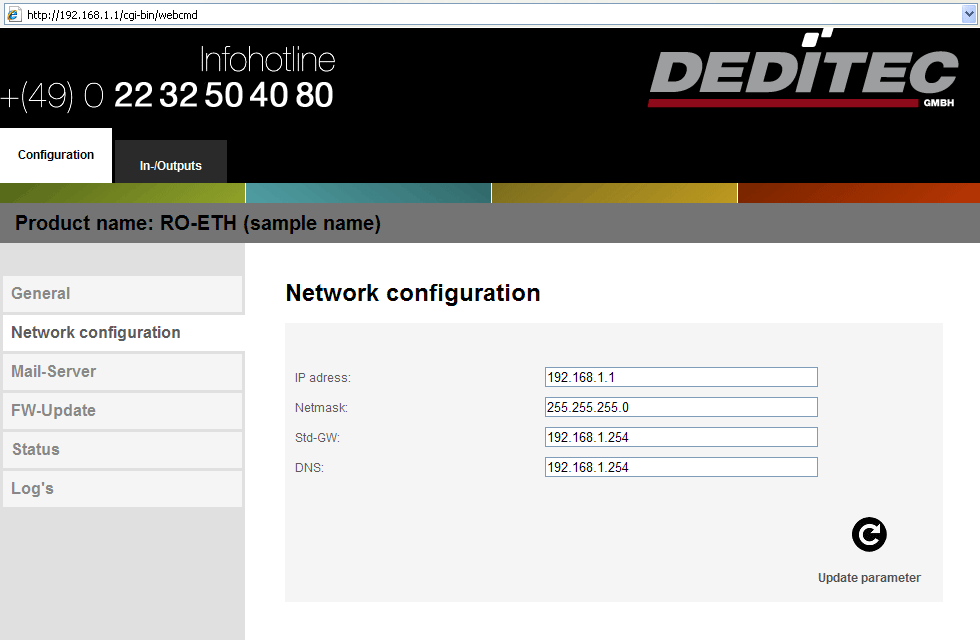 |
Click here to download the latest driver library.
You can find more details on control and some programming examples in the programming section.